Zur Nutzung einiger Google Module wird man aufgefordert, die
To use some Google modules, you will be asked to confirm ownership of your website.
For the Google Site Verification of your Partnershop, you have the option of storing a Google Site Verification Key in the Partnershop backend in the menu Marketing / Online Marketing so that it can be verified by Google.
You can integrate the Google Site Verification code into your Partnershop.
Switch to the Partnershop backend in the menu Marketing / Online Marketing. [1]
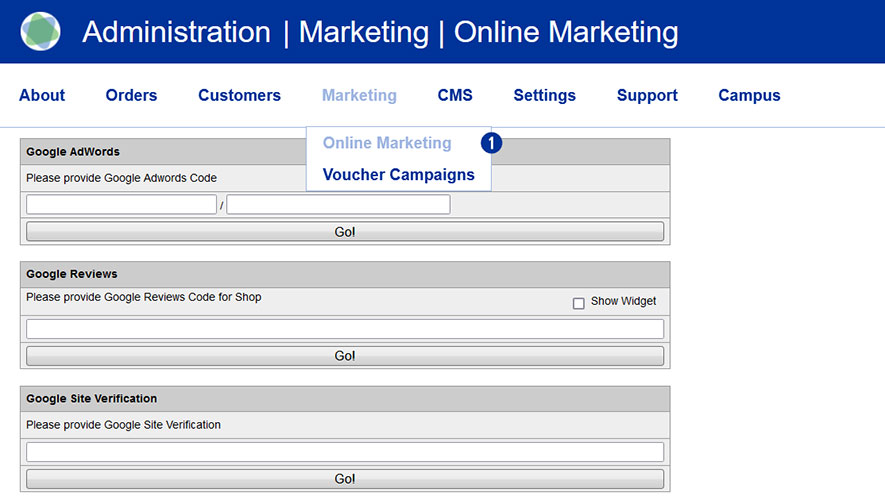
Under the module Google Site Verification [2], please enter the verification key (Google Site Verification Code) available to you in the input field. [3]
By clicking on the “Go!” [4] button, the code is saved permanently.
Yes. You can integrate the Google Tag Manager into your Partner
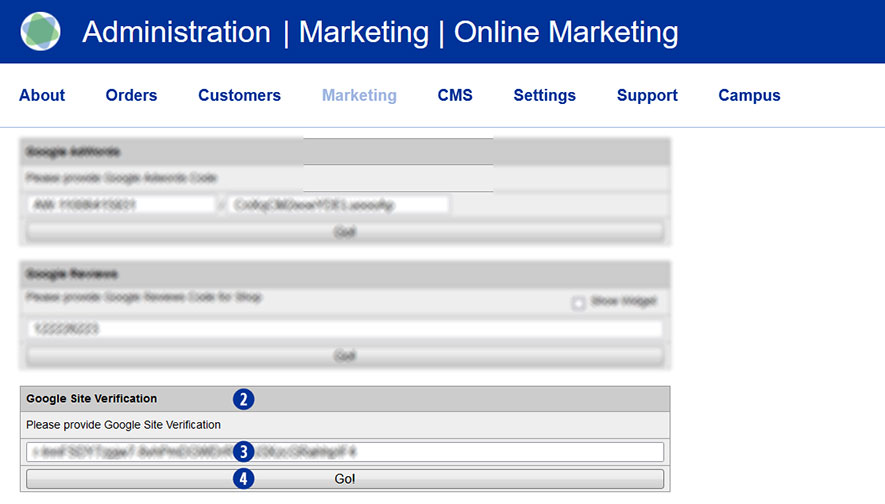
Switch to the Partnershop backend in the menu Marketing / Online Marketing. [1]
Under the module Google Tag Manager [2] , please enter the data you have – Google Tag Manager ID – in the input field. [3]
By clicking the button “Go!” , the ID is saved permanently.
This requires that you have a valid Google account.
No. The USS/Unitedprint brand is not openly communicated. Neither in the shop frontend, nor on invoices or shipping labels, etc. All contact points are customized with your brand.
As a default setting, your shop’s URL will have a “…unitedprintshopservices.com” component. In case you want to hide this URL and have your own URL displayed, please contact us.
No. Unitedprint won’t contact or even communicate directly with your customers. All communication with your customer either takes place automatically via your USS Partner Shop (and hence in your name) or by yourself.
Example 1: Order confirmation
After successfully receiving an order, your USS Partner Shop sends our a confirmation mail to your customer. This mail uses your imprint information and email address.
Example 1: Errors
In case there’s an order-related issue, which cannot be solved through automated emails (e.g. faulty print files), Unitedprint will contact you about it – not your customer.
Yes. Percentage of customer discounts can be granted.
To set a customer discount, go to the Partnershop backend under Customers. [1] Enter a search criterion (e.g. customer number) in the input mask [2] and then click the button “Go!”. [3]
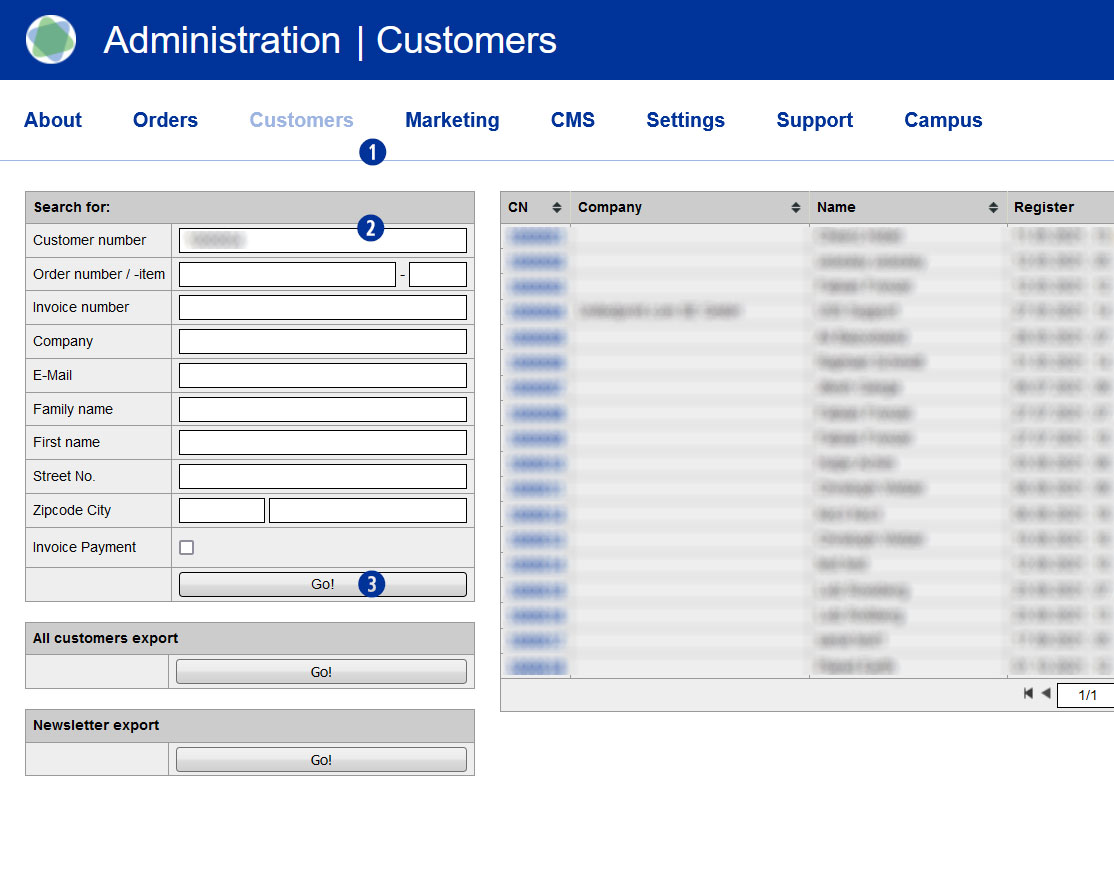
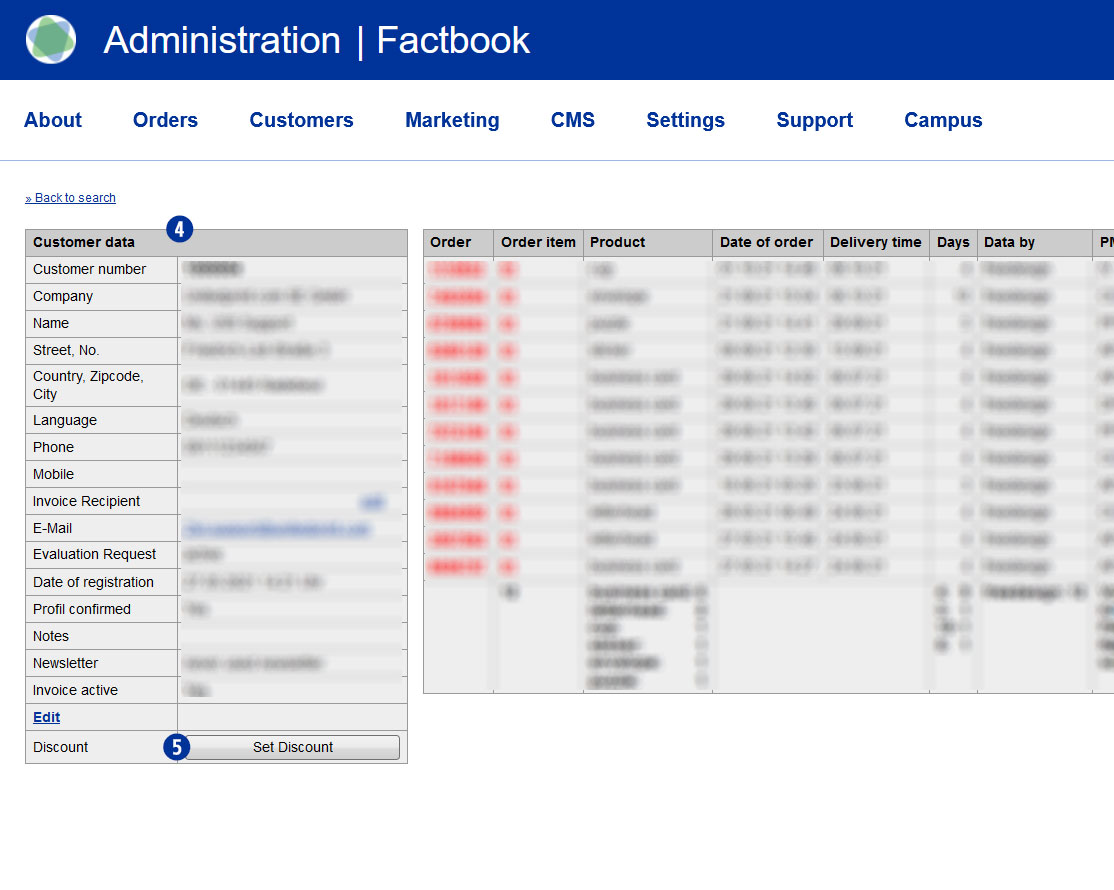
If the search result is successful, the window “Customer data” is displayed. [4]
Click the button “Set Discount” to enter a customer discount. [5]
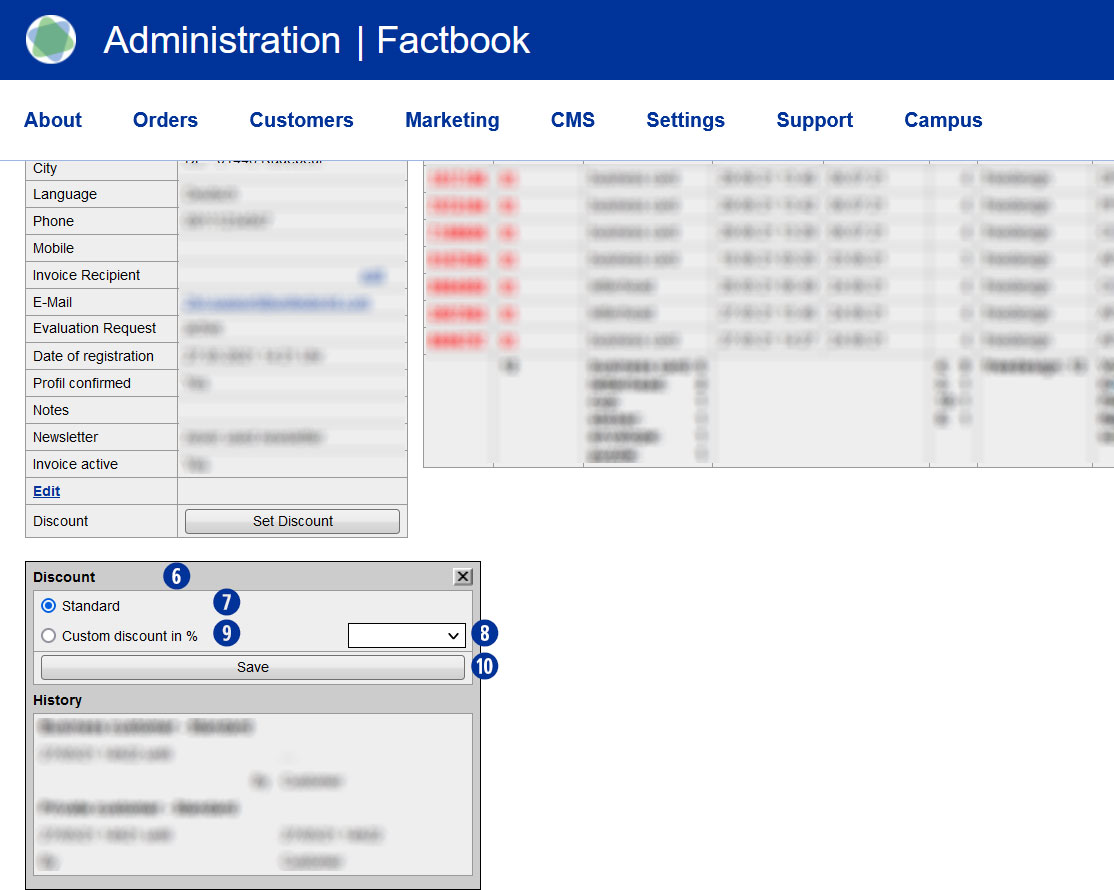
A mask “Discount” will opened. [6] If the customer has not yet deposited a discount, the mask “Discount” opens with the setting “Standard”. [7] Use from the selection list a discount rate between 1 and 100%. [8] The setting changes to “Custom discount in %”. [9] Save your selection by clicking on the button “Save”. [10]
Apart from the reduction in the product price, a deposited discount does not trigger any further actions on the type of shipment and the production period.
Note
A customer registered in the Partnershop (login) receives the discounted price already at the product selection.
If the customer is not yet registered in the Partnershop (login), the discount is displayed in the shopping basket.
In both cases, the discount is shown on the later invoice.
A partner with a discount can be identified in the Partnershop backend at the “SC” (Special Condition) in the “Customer data” window. [4]
The application of a voucher takes place in the order step “shopping cart”.
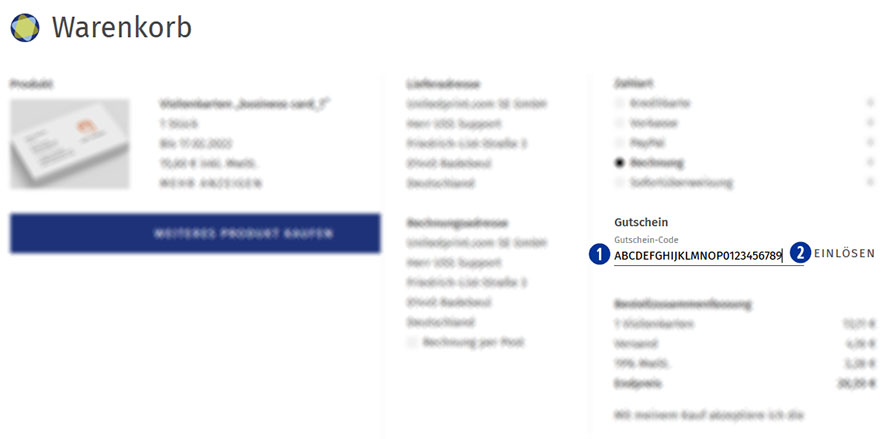
Please enter the coupon code in the input field “Voucher”. [01]
Confirm the entry and use of the voucher by clicking on the button “Redeem voucher”. [02]
An entered coupon code can be removed within the current order before the purchase. To do so, delete the coupon code from the input field “Coupon” and click the button “Redeem coupon”. [02]
A coupon code will not be accepted if the deposited minimum order value is undercut.
A coupon code can only be redeemed once.
So you have collected a larger number of business contacts over the time and you wonder what to do with these contact details in order to promote your online print shop? No matter if these contacts are existing client or merely prospective buyers: Contact information is a valuable asset that you should use in order to meet your communication targets (such as the establishment of a local brand or the promotion of your portfolio). In today’s widely digitalized world to send out personalized content to a large number of recipients with just a few clicks, saving you time and money – if you do it all right. The most popular mass communication channel is e-mail Marketing. Software solutions manage your contacts and all they need is your contacts’ names and e-mail addresses. The convenience of this channel allows you to put more effort into the preparation of content (and of course into other Sales/Marketing activities).
In case you lack ideas of when and what to write to your contacts, we would like to provide a little inspiration you with a potential year-round-calendar of potential newsletters.

In addition to such seasonal newsletters, you might want to add special campaigns, e.g. for customers who haven’t ordered for a while (you would select/group these contacts in your newsletter management tool) and are now offered a special discount for returning customers.
No matter what the occasion and the actual content of your newsletter are, you should make sure the recipients of your newsletter become readers. The first thing (and unfortunately rather often the only thing) your audience will see of your newsletter is its subject. Hence, this subject should be as attractive as possible so that the newsletter will not be ignored/deleted immediately. Our advice is to for instance mention your town’s/region’s name and maybe a promised benefit in the newsletter’s subject line (e.g. “Birmingham bar owners now safe 10% on catering supplies”). Apart from price campaigns you might also want to mention your businesses’ special services or print shop’s special features. When creating the actual newsletter, put more effort in an attractive image and write as little text as possible. You don’t want to “waste” your target group’s time but make them visit your web shop as soon as possible. For this reason we advice to integrate a “call to-action” button into your e-mail.
For setting up and realizing your newsletter campaigns we recommend the software tool MailChimp (https://mailchimp.com), which is free of charge for campaigns with less than 5.000 recipients. In addition we recommend tracking your newsletter’s success (conversion rate) by using Google Analytics.