If you want to use your Partnershop under your own domain you need two domains / subdomains.
You may, if not yet available, reserve through a Internet provider.
Examples
shop.mydomain.(de) – Subdomain of the Shop
Frequently Asked Question
If you want to use your Partnershop under your own domain you need two domains / subdomains.
You may, if not yet available, reserve through a Internet provider.
Examples
shop.mydomain.(de) – Subdomain of the Shop
For the Partnershop you do not need a web space (space for files on a Webserver) at your provider. Your entire shop is installed on the USS servers. A separate installation with you or your provider is not necessary.
Please, inform within 15 minutes after completion of order our support team Phone (020-34 99 03 68) / support@easyprint.co.uk.
Otherwise, your trial order needs to be paid. Additionally please cancel your trial order directly into your Partner backend.
For callback please hold ready the United Print ID of each order.
Yes. Log in to the Partnershop backend with the login data sent to you.
Then change in the menu Settings [1] to the module “change password”. [2]
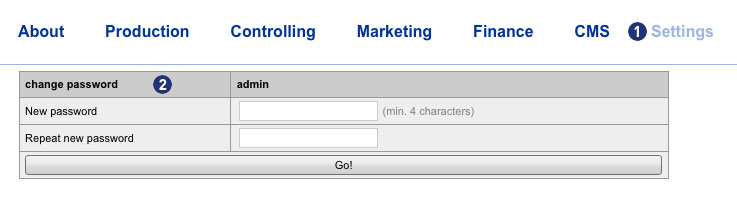 Enter your new password in the input field “New password” [3]. Repeat your entry in the field “Repeat new password”. [4]
Confirm your entry by clicking on the button “Go!”. [5]
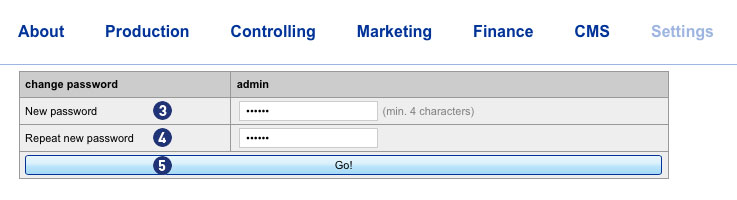 The next backend login is then only possible with the new password.
Note
The new password must be at least 4 characters long.
The entered password and its repetition must not be different.
Yes. Scheduled to be held every Wednesday from 08:00 until 12:00 o’clock maintenance on your Partnershop instead.
In this period, your Partnershop backend is not available for about 5-10 minutes.
Please note that you do not make any changes during this time via the Partnershop backend.
In order for your domain addresses to be able to call up the Partnershop, the following DNS settings are required at your domain provider.
| Domain | Typ | DNS-Eintrag |
| mydomain.com | ANAME | designer.mydomain.com |
| www.mydomain.com |
CNAME | designer.mydomain.com |
| designer.mydomain.com | CNAME | elb.unitedprintshopservices.com |
| meinedomain.de | TXT/SPF | v=spf1 include:sendamail24.com |
Optional Subdomain (example: www)
| Domain | Typ | DNS-Eintrag |
| mydomain.com | A | IP: XXX.XXX.XXX.XXX |
Using of more than two addresses (domain+subdomain) or two subdomains is not intended.
Note
It is strongly recommended to choose a provider that supports ANAME records.
If your provider does not have the option of using ANAME or ALIAS entries, an IP address can be assigned for this exceptional case.
Please contact our support via e-mail 2lvl-support@unitedprint.com.
Using an IP address to call up thePartnershop is only possible temporarily and with reservations.
Welcome at Unitedprint Shop Services!
When you receive your USS Partner Shop, it is already live, meaning that customers can already place orders, which will be forwarded to Unitedprint for production.
However: To fully customize your USS Partner Shop, please follow these 5 last steps:
Extra
Your USS Partnershop initially only offers so-called offline payment methods (purchase on account, purchase in advance).
In order to also be able to offer your customers online payment methods, you need to register with the payment service provider
Six Payment Services required. This takes place via a separate process.
If you have any questions, please contact the Setup Manager at the following email address: setup@unitedprintshopservices.com
Having completed these 5+1 steps, you can fully focus on promoting your USS Partner Shop.