SOFORT is a payment method from the third-party provider Klarna.
The following is required to activate the SOFORT payment method (instant transfer) in your Partnershop.
- Registration as an online provider with Klarna SOFORT
https://www.sofort.com/payment/users/register
- A valid account (user name, password) for the Saferpay system
- The availability of at least one active Saferpay terminal
- The creation of a new project for SOFORT
To do this, follow the steps in the documentation.
https://saferpay.github.io/sndbx/sofort.html
Note
We recommend using the Google Chrome browser to display the documentation in your language. You can use the integrated translation function to display the content of the page in your language. The language selection is based on the selected system language of your operating system or browser.
Activation in the Partnershop backend
To activate the online payment method SOFORT (direct payment) in your Partnershop, switch to the Partnershop backend after successfully completing steps 1-4.
Note
If you have not yet saved your Worldline business account in the Partnershop backend, please follow the steps for activation as described under Credit Card.
You can then activate the “Activate Payment by Directpay” checkbox in the “Activate payment methods” module on the same page (Finance > Payment) and confirm here with “Go”.
The payment method is then available to customers in the shopping cart.
Credit card payments are made in the partner shop via the provider Worldline | Six Payment Services offered.
First you need to register with Six Payment Services.
If you have any questions, please contact the Setup Manager at the following e-mail address: setup@unitedprintshopservices.com
When the registration with Six Payment Services has been completed, you will receive your activation data and access data for My Saferpay and the Merchant Portal (My Portal) from Six Payment Services by e-mail.
To receive the data required to activate the credit card payment method in your Partnershop, please proceed as follows:
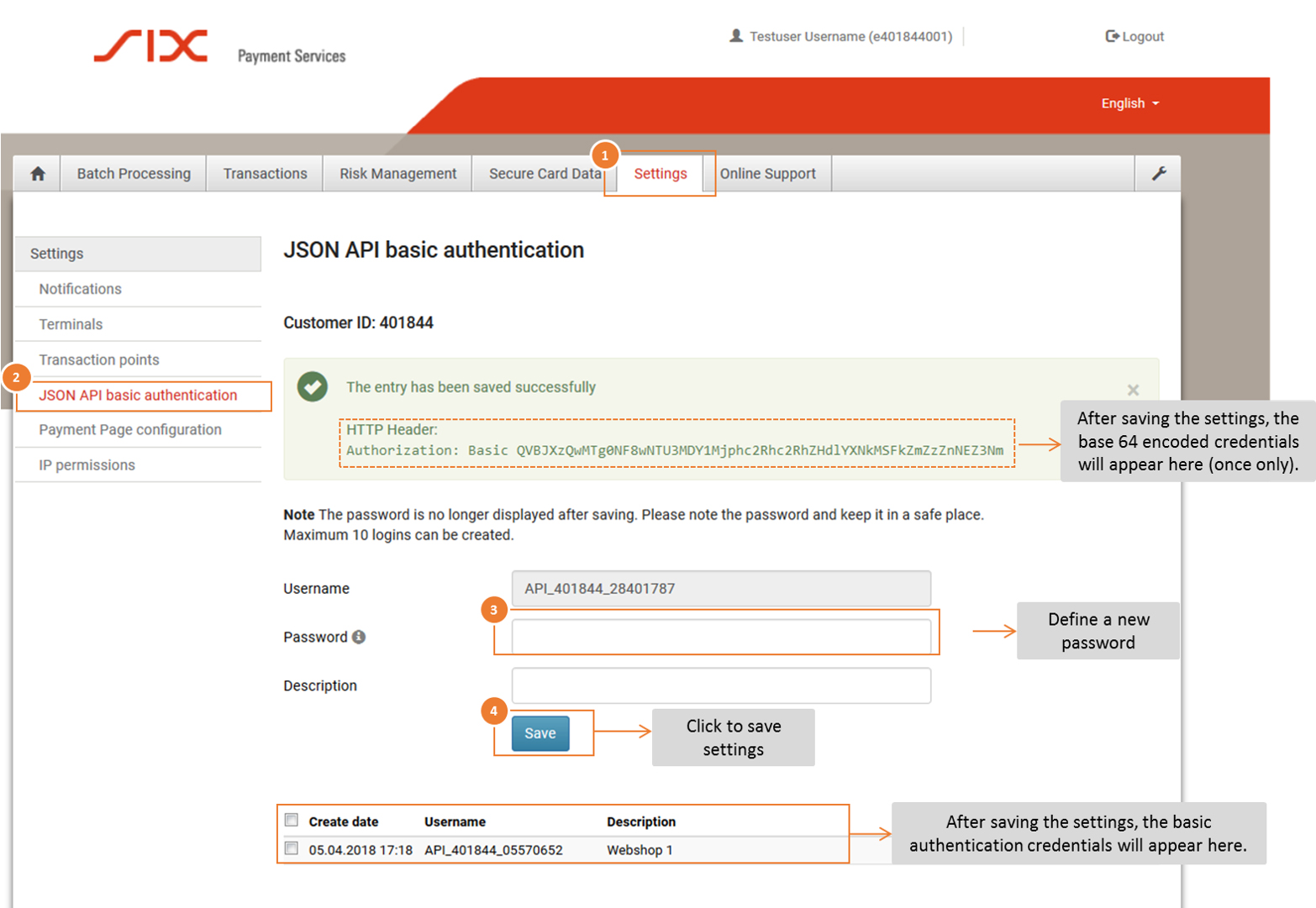
- Log in to the Saferpay Backoffice (My Saferpay) with your Saferpay user name and the corresponding password in order to create the JSON API access data.
- After successfully logging in, navigate to “Settings” (1) and then to “JSON API Basic Authentication” (2).
- Define your API password (3). Click the “Save” button (4) to save your entries.
Activation in the Partnershop backend
Open your Partnershop backend in the Finance > Payment area and enter the required data in the “Indicate your Worldline business account” module.
- API username: This is the username which is displayed in My Saferpay > Settings> JSON API Basic Authentication, e.g. API_401844_28401787
- API password: This is the password that you have defined in My Saferpay.
- Customer ID: The CustomerID is a 6-digit sequence of numbers and is displayed in My Saferpay > Settings > JSON API Basic Authentication. It is also part of the username API, e.g. 401844
- Terminal ID: You can find the Terminal ID (for e-commerce transactions) on the one hand in My Saferpay > Settings > Terminals and on the other hand in the activation data sent to you by SIX Payment Service by e-mail. The Terminal ID usually has the format 17xxxxxx.
Confirm the entries in the Partnershop backend with the button “Go” .
You can then activate the “Activate Payment by credit card” checkbox in the “Activate payment methods” module on the same page (Finance > Payment) and confirm here with “Go”.
The payment method is then available to customers in the shopping cart.
Saferpay is the payment system from Worldline | Six Payment Services for all online solutions. The cloud-based payment solution ensures the secure payment processing of all orders via your Partnershop. Saferpay enables access to a large number of payment methods and supports all known payment methods, including those from third-party providers such as Klarna.
Worldline | Six Payment Services is a so-called Payment Service Provider (PSP), through which your customers are offered various online payment methods within the Partnershop. Six Payment Services has contracts and technical connections with the individual online payment services and thus acts as a link between the merchant and the merchant bank.
The operation of a USS Partnershop does not necessarily require registration with Six Payment Services, as your customers do too
Offline payment methods are available (invoice, payment in advance). However, we recommend activating online payment methods. To do this, you need to register with Six Payment Services. This takes place via a separate process.
If you have any questions, please contact the Setup Manager at the following e-mail address: setup@unitedprintshopservices.com
The following online payment methods are currently available to you when you register for Six Payment Services.
- Credit card
- Direct payment (SOFORT)