If an order from your customer was ordered with the payment method Advance payment or Invoice you must confirm receipt of payment.
To do this, follow the steps below.
Advance payment
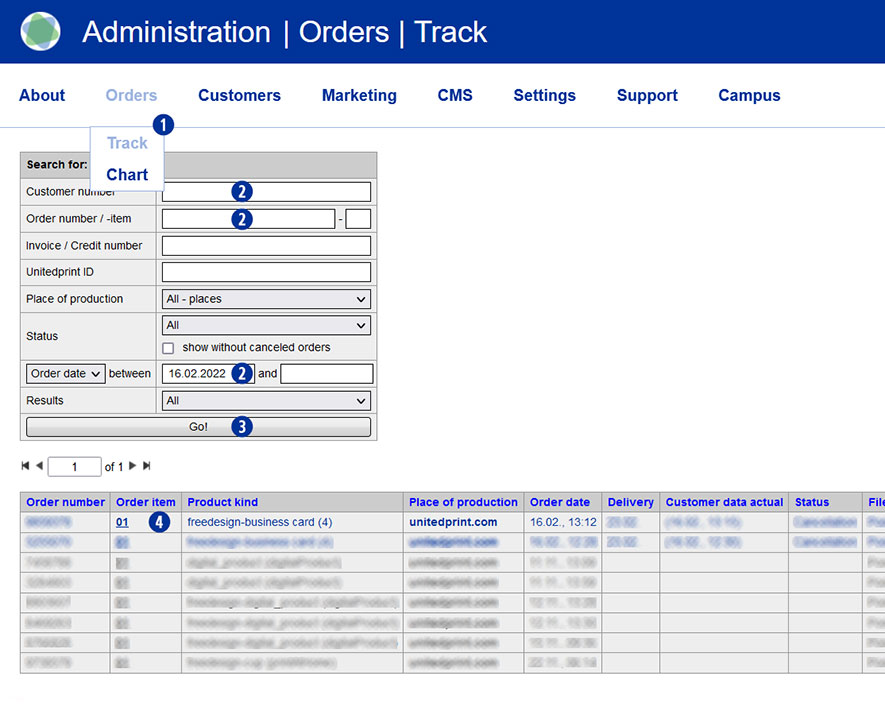
- Switch to the Partnershop backend menu under Orders / Track. [1]
- Select a search criterion [2] and confirm this with the “Go!” button. [3]
- In the search results list, click on the order item in the column “Order item” that is to be confirmed. [4]
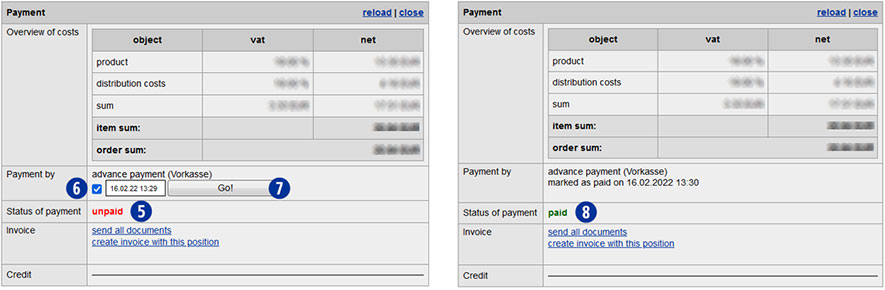
The current order status is displayed as “unpaid” in the line “Status of payment” of the Payment module. [5]
- Within the detail view in the module “Payment” / “Payment by”, please activate the checkbox “advance payment”. [6]
- Confirm your selection with the button “Go!”. [7]The order is shown as “paid” in the line “Status of payment”. [8]
Note
Only after conversion of the status to “paid” an order with Advance payment will be transmitted automatically to Unitedprint.
Invoice
- Switch to the Partnershop backend menu under Orders / Track. [1]
- Select a search criterion [2] and confirm this with the “Go!” button. [3]
- In the search results list, click on the order item in the column “Order item” that is to be confirmed. [4]
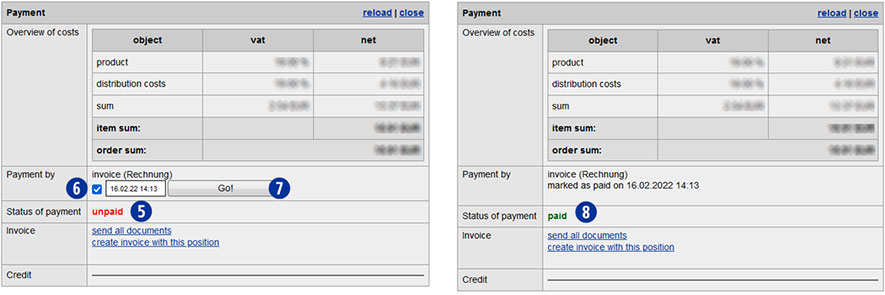
The current order status is displayed as “unpaid” in the line “Status of payment” of the Payment module. [5]
- Within the detail view in the module “Payment” / “Payment by”, please activate the checkbox “Invoice”. [6]
- Confirm your selection with the button “Go!”. [7]The order is shown as “paid” in the line “Status of payment”. [8]
Note
If a PayPal payment is displayed as “unpaid”, please check the payment transactions in your PayPal business account.
Once the payment has been received, confirm receipt of payment there. If no payment has been received, please inform your customer.
Unconfirmed PayPal payments for Partnershop orders are not transmitted to Unitedprint and will therefore also not produced.